Browse the whole shoot
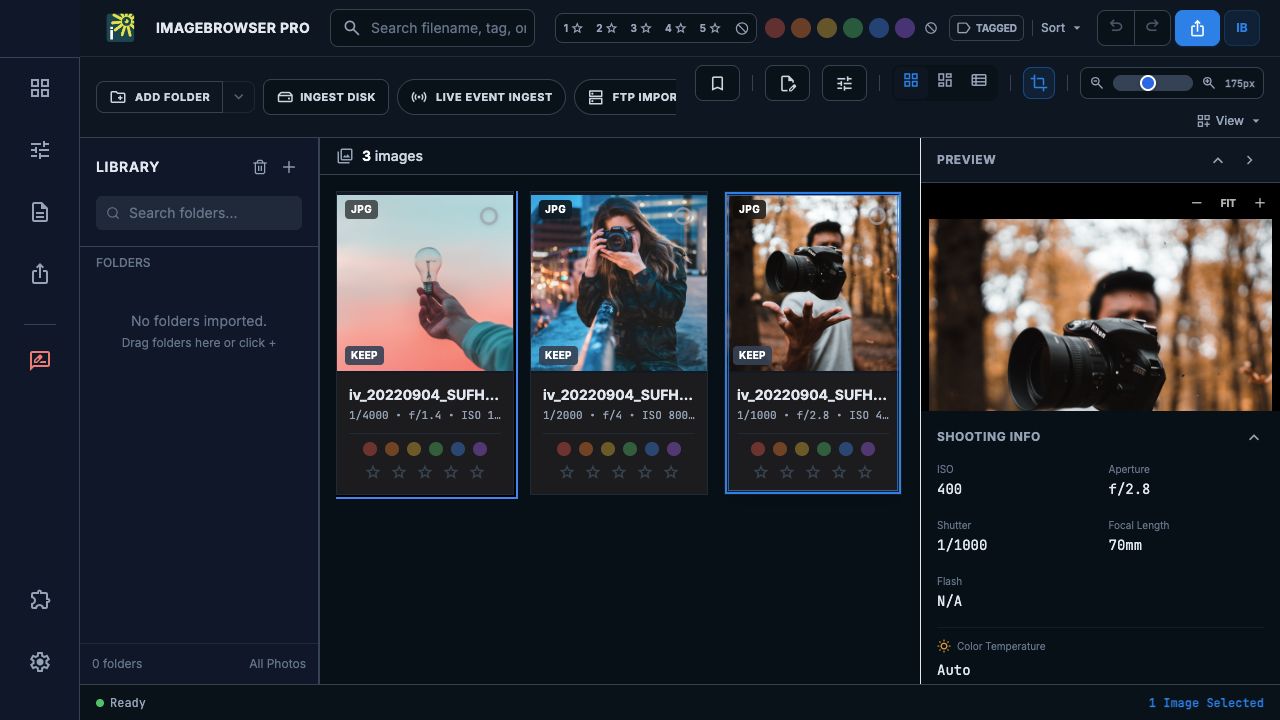
Open files or folders, work across multiple folder tabs, and move between a thumbnail grid and a large preview. RAW + JPEG pairing keeps matching captures together in the browser.
IMAGEBROWSERPRO / PRODUCT OVERVIEW
A desktop photography workspace for the decisions between opening a shoot and delivering the finished edit. Browse, compare, select, caption, and prepare photographs without losing sight of the image.
ONE PLACE TO MAKE THE EDIT
Open files or folders, work across multiple folder tabs, and move between a thumbnail grid and a large preview. RAW + JPEG pairing keeps matching captures together in the browser.
Use star ratings, color labels, and picks as you review. Save named selection sets across folders so an edit can be revisited without rebuilding the selection.
Write captions, credit, copyright, and keywords in the metadata workspace. Reusable templates and code replacements help with repeated information.
Review a shoot, identify the strongest frames, and prepare accurate information for the people receiving your work.
Compare neighboring frames, make In / Keep / Out decisions, and build a sequence. The final edit remains a human decision.
Practice the fundamentals of a professional photo workflow: observation, selection, captions, metadata, and delivery.
A FOCUSED DESKTOP TOOL
Use the built-in crop and exposure/color tools for essential adjustments, or open selected photographs in a companion editor. ImageBrowserPro can sit alongside the editing applications you already use.
NEXT / THE PHOTO WORKFLOW